
CLAP plugins for FL Studio
Bass Foundry
Eight open-source plugins for writing, designing and mixing riddim, dubstep and bass music. Most of them follow the played note, so a setting means the same thing on every note.
- Free & open source
- CLAP
- Windows x64
- FL Studio 2024.1+
- No accounts, no telemetry
The idea
One setting, every note
Riddim and dubstep basses change patch on every switch-up and move across an octave or two. Fixed-frequency tools then act differently on every note: the sub jumps, an EQ cut lands on another harmonic, the distortion fizzes on one note and goes dull on the next. Anvil, Lathe, Temper and Knurl track the pitch, from the audio or from MIDI, and put their work on the note itself.
Dots are the harmonics of each note on a log frequency axis (Hz). The fixed cut takes the 3rd harmonic of F1, the 2nd of C2 and the fundamental of C3. The tracked cut stays on the 3rd.
The plugins
Cast, shaped and finished
Each plugin is a separate product with its own version, guide and release. Every download is a ZIP with one.clap file and a checksum. The editor previews below are rendered from the plugins’ own code.
Join motifs into connected musical phrases.
Smooth harsh resonances while retaining character.
Replace the sub with a clean sine at one level and phase for every note.
Capture the last bars, slice them and export clean, key-labelled samples.
EQ the harmonics of the played note: a cut on harmonic 3 stays on harmonic 3.
Distortion whose drive and tone filters follow the note, so every note distorts the same.
Align the phase of a bass layer to a sidechain layer so the two sum instead of cancel.
Give every cycle of the note its own level, timing and grit.
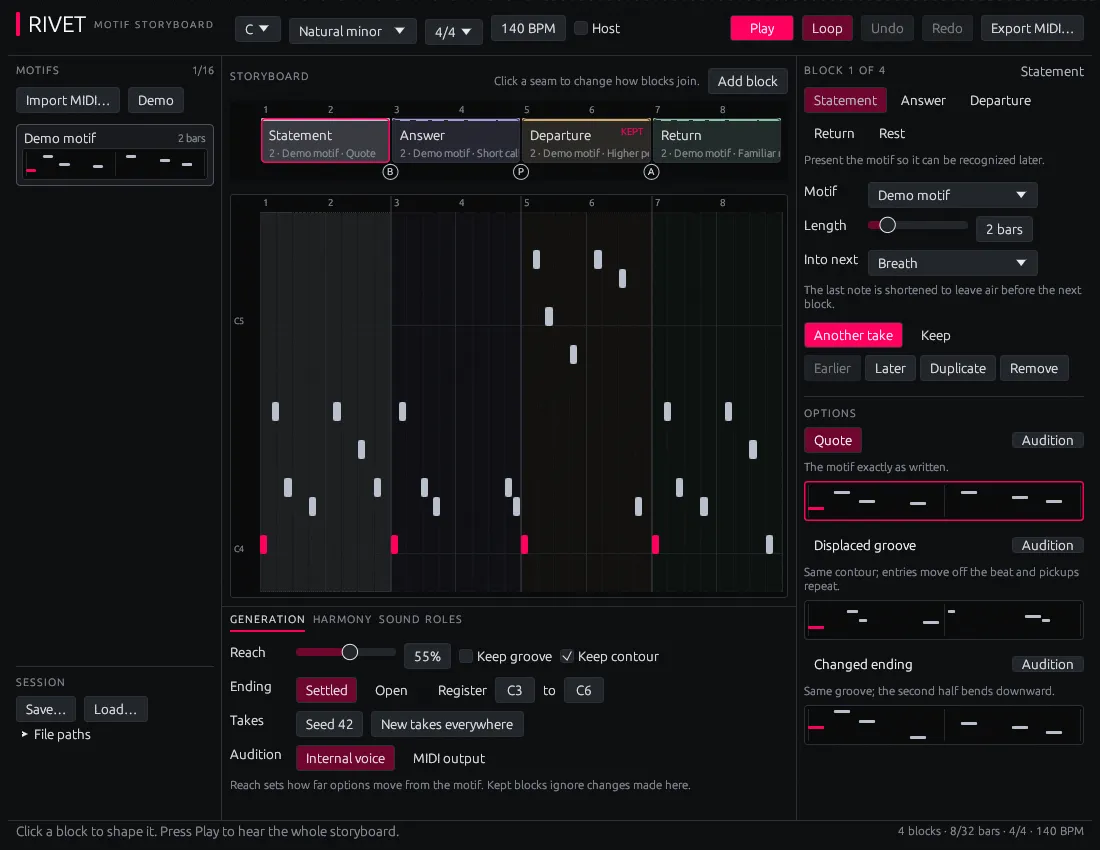


Install
Into the rack in a minute
The plugins are built for FL Studio 2024.1 or newer on Windows x64. Nothing to register, no installer, no account.
- 01
Download
Pick a plugin above, or open its release on Gitea. Each ZIP has a
.sha256file next to it to check the download. - 02
Copy the .clap file
Extract the ZIP and copy the
.clapfile intoC:\Program Files\Common Files\CLAP\ - 03
Rescan in FL Studio
Open Options → Manage plugins, enable Verify plugins and click Find installed plugins. The plugins appear under the vendor Bass Foundry.
- 04
Load it
Rivet goes in the Channel Rack. All the others go in mixer effect slots; each plugin’s page says where it sits best.
Principles
Built like tools
The same rules hold for every plugin in the suite. CI checks the testable ones on every push.
Follows the note
Pitch comes from the audio with a short lookahead, or from MIDI. Settings are counted in harmonics and cycles, not in Hz.
Realtime-safe
Every audio effect has a test that fails if the audio thread allocates memory. The audio thread never waits on a lock.
Honest latency
Plugins that look ahead report it to the host, so FL Studio compensates the delay and the mix stays in time.
Tested without a DAW
CI loads each plugin through the CLAP ABI and checks ports, latency, state and audio at 44.1, 48 and 96 kHz.
Shows its work
The editors draw what the plugin hears and what it changes: cuts, harmonics, recovered level, cycle shapes.
Open and private
ISC-licensed Rust. No accounts, no licence keys, no network access and no telemetry.
The foundry
Named after metalwork
The suite is the foundry: the workshop where the bass gets cast, shaped and finished. Each plugin is named after the craft that does the same job to metal.
- Rivet
- A rivet joins separate pieces into one.
- Patina
- A patina changes the surface of a metal and keeps its character.
- Anvil
- An anvil is the solid base that everything is struck on.
- Crucible
- A crucible melts material down so it can be cast again.
- Lathe
- A lathe turns a piece so every cut lands the same all the way round.
- Temper
- Tempering sets how hard and how tough a metal ends up.
- Weld
- A weld fuses two pieces into one.
- Knurl
- Knurling presses a ridged grip pattern into a surface.
On the bench
What could come next
Ideas from the ideas list, each written against a problem seen in bass-music production. Most of the new ones are about texture. These are ideas, not promises.
Ballast
Switch-up loudness leveller
Measures perceived loudness per switch-up and sets gain only, so every patch lands at the same loudness without compression.
Gauge
Low-end mono check
Correlation and mono-sum loss per band and per note in the bass range, with the notes where widening breaks the sum marked.
Bellows
Pitch-tracked resonator
A comb resonator tuned to the played note: noise, distortion or drums turn into metallic tone that is in key on every note.
Anneal
TextureTone and grit split
Splits a sound into harmonic tone, the grit between the harmonics, and transients. More grit, same body and sub.
Swarf
TextureIn-key granular shavings
Sprays grains of the bass back as a layer, each a whole number of cycles and retuned to the current note.
Etch
TextureTexture imprint
Imprints the fine surface of a scrape, a vocal or a field recording on the bass, locked to its harmonics.
Chase
TextureTalking formants
A vowel pad with drawn paths. Snap moves each formant peak onto a harmonic, so no vowel vanishes between two harmonics.
Damascus
TextureTexture step sequencer
Four gain-matched texture slots and a step grid that switches between them: a switch-up inside one held note.
Loupe
TextureTexture meter
Roughness, grit, metal and brightness per note, with every switch-up of a drop placed on a texture map.